Distributed GPT model (part 2): pipeline parallelism
This post follows from the previous post where we perform distributed training of a GPT model using Data parallelism, where we implemented Data Parallelism on a GPT model. Pipeline parallelism is one dimension of the 3D parallelism of ML models, via Data, Pipeline and Tensor/Model parallelism. In this post we will discuss and implement pipeline parallelism.
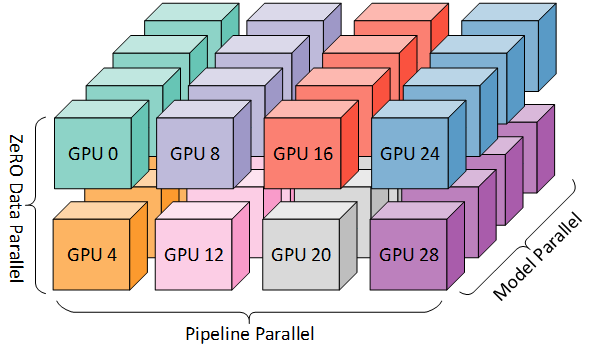
The 3D parallelism aims and partitioning (color-coded) computer resources across the 3D space of data, pipeline and tensor (model) dimensions. In this post we will focus on pipeline parallelism. Source: Microsoft Research Blog
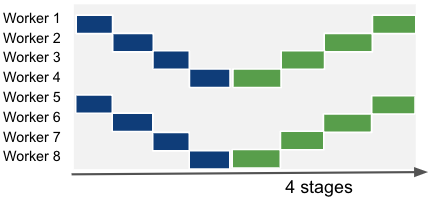
Imagine we have a model that is too large to fit in the local memory of a single process. A simple way to overcome this is to split the model across the layer dimension and delegate a subset of layers to each process. Then we can do a forward and backward pass by communicating activations and gradients between connecting processes. Each process is responsible for a subset of layers and is called a stage. This type of parallelism is called pipeline parallelism. The following picture gives us a simple illustration of the process:

Left-to-right timeline of a serial execution of the training of a model divided across 4 compute units (Workers) and 4 stages. Blue squares represent forward passes. Green squares represent backward passes and last for twice the amount of the forward pass. The number on each square is the data sample index. Black squares represent moments of idleness, i.e. of a worker not performing any computation. Source: PipeDream: Generalized Pipeline Parallelism for DNN Training (Microsoft, arXiv)
Now note that the above method would yield a low utilization of compute resources: processes would always have to wait for connecting layers in different processes to be computed before being able to do their share of the forward/backward compute. So pipeline parallelism is usually combined with micro-batching / gradient accumulation. In practice, we can split the mini-batch in several micro-batches and pass them sequentially to the first process of the pipeline. When a process finishes the current micro-batch, it sends its activations to the following process and receives the next micro-batch activations from the previous process. This is mathematically equivalent to regular gradient accumulation. This approach is detailed in the paper GPipe: Efficient Training of Giant Neural Networks using Pipeline Parallelism (Google, 2018, arXiv) and can be illustrated as:

A pipeline execution with gradient accumulation, computed as a sequence of 4 micro-batches. Source: PipeDream: Generalized Pipeline Parallelism for DNN Training (Microsoft, arXiv)
Setting a high micro-batching factor can lead to high memory usage, as we have to store activations until we finish the backward pass for the current mini-batch. This can be improved by (1) activation offloading, which stores and loads activations to/from the CPU when needed; and (2) activation checkpointing at the beginning of every stage, which recomputes activations during the backward pass when needed instead of keeping them always in memory.
The other hyper-parameter we have to define is the number of stages. Up until now, the examples above used a number of stages equivalent to the number of workers, i.e. a single pipeline that spans all workers. However, we can have multiple pipelines in parallel and combine pipeline parallelism with other dimensions of parallelism. As an example, if you’d combine pipeline and data parallelism on an 8-GPU network:

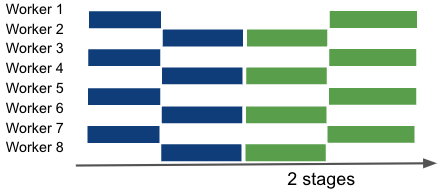
An illustration of different combinations of pipeline and data parallelism. Left: 8 pipeline-parallel workers. Center: 2 data-parallel groups of 4 pipeline-parallel workers. Right: 4 data-parallel groups of 2 pipeline-parallel workers.
You will notice that no matter the pipeline configuration we use, there are periods of idleness that we cannot remove. With this in mind, there is plenty of work ongoing to improve this. As an example, PipeDream: Generalized Pipeline Parallelism for DNN Training (Microsoft, arXiv) is a pipeline method that overlaps forward and backward passes of different mini-batches, by keeping track of the version (micro-batch id) and storing several versions of activations and parameters whose backward pass hasn’t completed:

The PipeDream scheduling algorithm. Several forward passes can be in flight, even if they derive from different micro-batches. Backward passes are prioritized over forward passes on each worker. Source: PipeDream: Generalized Pipeline Parallelism for DNN Training (Microsoft, arXiv)
Where’s the caveat? In practice, mixing forward and backward passes from different mini-batches can lead to wrong parameter updates. Therefore, the authors perform versioning of the parameters, effectively having several versions of the same parameters in the model. Forward passes use the latest version of the model layers, and the backward may use a previous version of activations and optimizer state to compute the gradients. This leads to a substantial increase in memory requirements.
Implementing pipeline parallelism with PyTorch
Before we jump into DeepSpeed’s 1F1B pipeline engine, it is helpful to implement the simplest possible pipeline parallel training loop in plain PyTorch. The goal of this section is not performance. It is simply to show the mechanics of:
- partitioning a model into
num_stagessequential stages, - sending activations forward stage-by-stage,
- sending activation gradients backward stage-by-stage,
- and performing one optimizer step per mini-batch (optionally using micro-batches).
To match the scheduling shown in the figure (no overlapping micro-batches between stages), we use a non-overlapped schedule: we run an entire micro-batch through all forward stages, then run its backward pass all the way back, and only then move to the next micro-batch. This is conceptually the most straightforward schedule, but it leaves lots of bubbles (idle time) and is mainly for learning/debugging.
Below is a minimal example. It assumes:
- one pipeline group of size
num_stages(oftennum_stages == world_sizefor a single pipeline), - each rank is one stage (
stage_id = rank_in_pipeline), - each stage holds a
nn.Sequentialblock of layers.
Note: This is a toy implementation. In real systems you also need: shape/metadata communication, mixed precision, activation checkpointing, pipeline/data parallel composition, and better schedules (like 1F1B).
import torch
import torch.distributed as dist
import torch.nn as nn

def split_layers(layers, num_stages):
    # naive equal split (by count). Real code should load-balance by params/runtime.
    idx = torch.arange(len(layers))
    chunks = torch.chunk(idx, num_stages)
    return [nn.Sequential(*[layers[i] for i in c.tolist()]) for c in chunks]

def pipeline_step_no_overlap(x_mb, y_mb, stage, stage_id, num_stages, criterion):
    """Run one micro-batch through the full pipeline forward, then full backward."""

    # ---- Forward ----
    if stage_id == 0:
        act = x_mb.detach().requires_grad_(True)
        act = stage(act)
        dist.send(act, dst=stage_id + 1)
    elif stage_id < num_stages - 1:
        # receive activation from previous stage
        act = torch.empty_like(x_mb)  # placeholder; in practice you must know the correct shape
        dist.recv(act, src=stage_id - 1)
        act = act.detach().requires_grad_(True)
        act = stage(act)
        dist.send(act, dst=stage_id + 1)
    else:
        # last stage: receive, compute loss
        act = torch.empty_like(x_mb)  # placeholder; in practice you must know the correct shape
        dist.recv(act, src=stage_id - 1)
        act = act.detach().requires_grad_(True)
        out = stage(act)
        loss = criterion(out, y_mb)
        loss.backward()
        # send grad of activation to previous stage
        dist.send(act.grad, dst=stage_id - 1)
        return loss.detach()

    # ---- Backward (non-last stages) ----
    # receive grad from next stage, backprop through local stage, send to previous
    grad_act = torch.empty_like(act)
    dist.recv(grad_act, src=stage_id + 1)

    act.backward(grad_act)

    if stage_id > 0:
        dist.send(act.grad, dst=stage_id - 1)

    return None

def train_one_minibatch(model_layers, num_stages, optimizer, criterion, x, y, micro_batches=1):
    """Each rank runs only its local stage."""
    rank = dist.get_rank()
    stage_id = rank  # single pipeline group example

    stages = split_layers(model_layers, num_stages)
    stage = stages[stage_id].to(x.device)

    optimizer.zero_grad(set_to_none=True)

    x_mbs = x.chunk(micro_batches, dim=0)
    y_mbs = y.chunk(micro_batches, dim=0)

    loss_out = None
    for x_mb, y_mb in zip(x_mbs, y_mbs):
        loss = pipeline_step_no_overlap(x_mb, y_mb, stage, stage_id, num_stages, criterion)
        if loss is not None:
            loss_out = loss_out + loss if loss_out is not None else loss

    # Each stage has its own optimizer step (weights are disjoint across stages)
    optimizer.step()

    return loss_out
This shows the core idea: activations flow forward, gradients flow backward. The remaining sections use DeepSpeed to do the same thing, but efficiently and with better schedules (1F1B), load-balancing, activation checkpointing, and integration with other forms of parallelism.
Implementing pipeline parallelism with DeepSpeed
The pipeline parallelism algorithm implemented in DeepSpeed is the PipeDream-Flush implementation with default 1F1B scheduling (1 forward pass followed by 1 backward pass), however it is possible to extend pipeline parallelism to other algorithms. The 1F1B algorithm performs a sequence of forward passes, and asynchronously starts the backward pass for each micro-batch forward pass completed. It then waits for all forward and backward passes to complete before starting the new mini-batch.
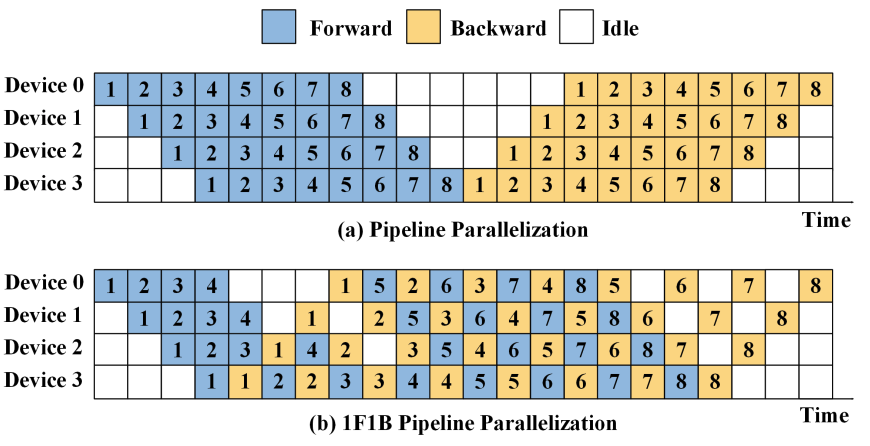
Regular and 1F1B pipeline algorithms diagram. Source: Training and Serving System of Foundation Models: A Comprehensive Survey
We will add pipeline parallelism to the GPTlite model implemented in the previous post, and enable it by passing the number of stages as the ---pipeline_num_stages argument (default: 0, no pipelining) on the command line:
## train.py

def get_cmd_line_args(description='GPT lite on DeepSpeed'):
  # ...
  parser.add_argument('--pipeline-parallel-size', type=int, default=0,
                      help='enable pipeline parallelism with N stages (0 means disabled)')
  # ...
DeepSpeed supports pipeline parallelism on any sequence of network blocks in a nn.Sequential container or list, that will be broken into pipeline stages. We’ll expose pipeline parallelism in our model by creating a method to_layers() in GPTlite, that returns the sequence of actions to be executed. Note that to_layers() follows the same order as the forward pass of GPTlite, and that self.blocks is of type nn.Sequential:
## gptlite.py

class GPTlite(nn.Module):
  # ...
  def to_layers(self):
      layers = [
          lambda idx:
            self.token_embedding_table(idx) +
            self.position_embedding_table(torch.arange(idx.shape[1]).to(idx.device)),
          *self.blocks,
          self.ln,
          self.lm_head,
      ]
      return layers
Note that the output of layers is of shape B,T,C which is incompatible with CrossEntropyLoss in PyTorch. A quick fix is to simply add lambda logits: torch.swapaxes(logits, 1, 2) to to_layers() to make it of shape B,C,T. However when you try to back-propagate, you may bump into the error RuntimeError: element 0 of tensors does not require grad and does not have a grad_fn, as discussed in bugs 4279 and 4479, and you’d have to use outputs = outputs.requires_grad_(True) to fix it. Alternatively, you can adapt the loss function to do the view/reshape change instead. It is a cleaner approach, and will be useful later for the pipeline parallelism use case:
## train.py

class CrossEntropyLoss_FlatView(torch.nn.Module):
  def forward(self, logits, labels):
    B, T, C = logits.shape
    logits = logits.view(B*T, C)
    labels = labels.view(-1)
    return torch.nn.functional.cross_entropy(logits, labels)

def main_deepspeed(n_epochs=100, random_seed=42):
  # ...
  criterion = CrossEntropyLoss_FlatView()  # initialize loss function
As a next step, in our DeepSpeed initialization code, we must create a pipeline wrapper around our model. This wrapped model is the new model variable that will be passed to deepspeed.initialize():
## gptlite.py

def get_model(criterion, vocab_size, pipeline_num_stages=0):
  # ...
  if pipeline_num_stages:
    deepspeed.runtime.utils.set_random_seed(random_seed)
    pipe_kwargs={
      'num_stages': pipeline_num_stages,
      'loss_fn': criterion,
      }
    model = gptlite.GPTlite(vocab_size).to(device_str)
    model = deepspeed.pipe.PipelineModule(layers=model.to_layers(), **pipe_kwargs)
  else:
    # ... as before: model = gptlite.GPTlite(vocab_size)
Finally, the training iteration code in the pipelining use case is reduced to a call to engine.train_batch(), that is equivalent to a forward pass, backward pass and gradient updates of an entire mini-batch of size engine.gradient_accumulation_steps() micro-batches:
## train.py

def main_deepspeed(n_epochs=100, random_seed=42):
  # ...
  for epoch in range(n_epochs):
    if pipeline_num_stages:
      step_count = len(train_dataset) // engine.gradient_accumulation_steps()
      for step in range(step_count):
        loss = engine.train_batch()
    else:
      # ... forward, backward, and update step as before
An important nuance: by default, pipeline parallelism expects all mini-batches of the dataset (i.e. in every call to train_batch()) to be of the same shape. If this is not the case, you can reset the shapes at the onset of every mini-batch by running engine.reset_activation_shape(), and this will introduce an additional communication step to broadcast the shapes of the first micro-batch as the default for the remaining micro-batches. However, it is not possible to have different shapes across micro-batches, and the only workaround is to trim or pad all micro-batches of a mini-batch to the same shape beforehand.
As a final remark, pipeline parallelism is not compatible with ZeRO stages 2 or 3, as discussed here.
Increasing compute and memory efficiency with LayerSpec (optional)
The implementation of pipelining for the GPTlite model above is neither memory efficient nor scalable as each GPU replicates the whole model in memory. See Memory-Efficient Model Construction for details. So we will use the DeepSpeed class LayerSpec (API) that delays the construction of modules until the model layers have been partitioned across workers, therefore having each worker allocate only the layers it’s assigned to. To do this, we will create a new model class GPTlitePipeSpec that inherits from PipelineModule with an __init__ method that follows very closely the forward() pass in the original GPTlite.
The tricky bit here is that the LayerSpec constructor only works with the type nn.Module as argument, and some operations, specifically the sum of embeddings in forward(), is not of type nn.Module. To overcome this, we create the class EmbeddingsSum that encapsulates that logic into an nn.Module. We will also use CrossEntropyLoss_FlatView as the loss function. The full implementation for the pipeline class is then:
## gptlite.py

from deepspeed.pipe import PipelineModule, LayerSpec

class GPTlitePipeSpec(PipelineModule):

  class EmbeddingsSum(nn.Module):
    """Converts tok_emb + pos_emb into an nn.Module. Required for LayerSpec."""

    def __init__(self, vocab_size):
      super().__init__()
      self.token_embedding_table = nn.Embedding(vocab_size, n_embd)
      self.position_embedding_table = nn.Embedding(block_size, n_embd)

    def forward(self, idx):
      B, T = idx.shape
      tok_emb = self.token_embedding_table(idx)
      pos_emb = self.position_embedding_table(torch.arange(T).to(idx.device))
      return tok_emb + pos_emb

  def __init__(self, vocab_size, pipe_kwargs):
    self.specs = \
      [ LayerSpec(GPTlitePipeSpec.EmbeddingsSum, vocab_size) ] + \
      [ LayerSpec(Block, n_embd, n_head) for _ in range(n_layer)] + \
      [ LayerSpec(nn.LayerNorm, n_embd),
        LayerSpec(nn.Linear, n_embd, vocab_size, bias=False) ]
    super().__init__(layers=self.specs, **pipe_kwargs)
then we add the flag --pipeline_spec_layers to the command line arguments, so that we can optionally enable this feature:
## train.py

def get_cmd_line_args():
  # ...
  parser.add_argument("--pipeline_spec_layers", action="store_true",
                      help="enable LayerSpecs in pipeline parallelism")
and change the get_model() method to retrieve the efficient pipeline variant as:
## gptlite.py

def get_model(criterion, vocab_size, pipeline_num_stages=0, pipeline_spec_layers=False):

  if pipeline_num_stages:
    if pipeline_spec_layers:
      model = GPTlitePipeSpec(vocab_size, pipe_kwargs=pipe_kwargs)
    else:
      # ... GPTlite model as before
We will denominate the LayerSpec-based implementation of pipeline parallelism by memory-efficient pipelining.
For heterogeneous models, load balancing of the model across GPUs may be an issue. There are several metrics to load balance from: runtime, memory usage, parameter count, etc. Here, we will not tune the load balancing method for pipeline modules, and will instead use the default partition_method=parameters. This assigns layers to stages in a way that load-balances parameters, i.e. stages may have different lengths. Finally, in the extreme case the 1F1B algorithm is not the pipeline algorithm we want, we can extend pipeline parallelism with a different algorithm.
Activation checkpointing
Introducing activation checkpointing at every X layers in our pipeline is straightforward, we just need to specify that interval in the argument activation_checkpoint_interval in the PipelineModule constructor:
#gptlite.py

def get_model(criterion, vocab_size, pipeline_num_stages=0, \
  pipeline_spec_layers=False, activation_checkpoint_interval=0):

  if pipeline_num_stages:
    pipe_kwargs={ # ...
      'activation_checkpoint_interval': args.activation_checkpoint_interval,
    }
  # ....
However, activation checkpointing is also tricky to configure when using pipelining if the checkpoint layer falls in another GPU. The rationale is that if a checkpoint layer falls in a different GPU than the layer being back-propagated, this requires extra communication. This is a use case that I believe DeepSpeed is not handling correctly, so make sure there’s a checkpoint layer at the beginning of the first block on each GPU.
Gradient accumulation and micro-batching
We can define the micro-batching level by setting the fields train_micro_batch_size_per_gpu (defaulted to train_batch_size) or gradient_accumulation_steps (defaulted to 1) in the DeepSpeed config file. At runtime, the number of micro-batches can be retrieved by engine.gradient_accumulation_steps().
Results
We changed our config to ds_config.json to run ZeRO stage 1 and tested our execution with different stage count and the memory-efficient SpecLayer implementation of our GPT model (with --pipeline_num_stages <num_stages> --pipeline_spec_layers). We did not use activation checkpointing due to an open bug 4279. We tested 1, 2, 4 and 8 pipeline stages per run. We rely on the default DeepSpeed algorithm for load balancing of stages, based on the parameter count. As an example, for the partitioning of GPTlite pipeline across 8 GPUs and 4 stages, it outputs:
RANK=0 STAGE=0 LAYERS=4 [0, 4)   STAGE_PARAMS=21256704 (21.257M)
RANK=2 STAGE=1 LAYERS=3 [4, 7)   STAGE_PARAMS=21256704 (21.257M)
RANK=4 STAGE=2 LAYERS=3 [7, 10)  STAGE_PARAMS=21256704 (21.257M)
RANK=6 STAGE=3 LAYERS=6 [10, 16) STAGE_PARAMS=21308160 (21.308M)
Pipelining with optimized vs non-optimized memory efficiency implementation. Using the SpecLayer-based implementation of the PipelineModule in our pipeline runs resulted in a reduction of about 40% in memory consumption for the GPTlite and deep benchmark models when running pipeline parallelism with the highest stage count (8).
Memory usage: on pipeline parallelism, I noticed that the first GPU seems to require a higher amount of memory when compared to the remaining GPUs. This should not be the case, particularly on the deep benchmark model where we can guarantee a quasi-ideal stage partitioning across GPUs. This disparity in memory usage on GPU 0 is the main indicator of the maximum memory required, and balancing this would bring that value down. I opened a bug report with DeepSpeed and will wait for their feedback or fix to correct this analysis.
Note: I will add detailed results for pipeline parallelism in the future when time allows.
Implementation
This code is available in the GPTlite-distributed repo, if you feel like giving it a try.